Catch what needs you
Questions and likely approvals rise to the top in a distinct attention state.
 Clarence D’Cursor
Clarence keeps watch over every Cursor agent and subagent, then lets you know when something needs your attention.
Version 1.2.2 · macOS 14+ · Apple Silicon
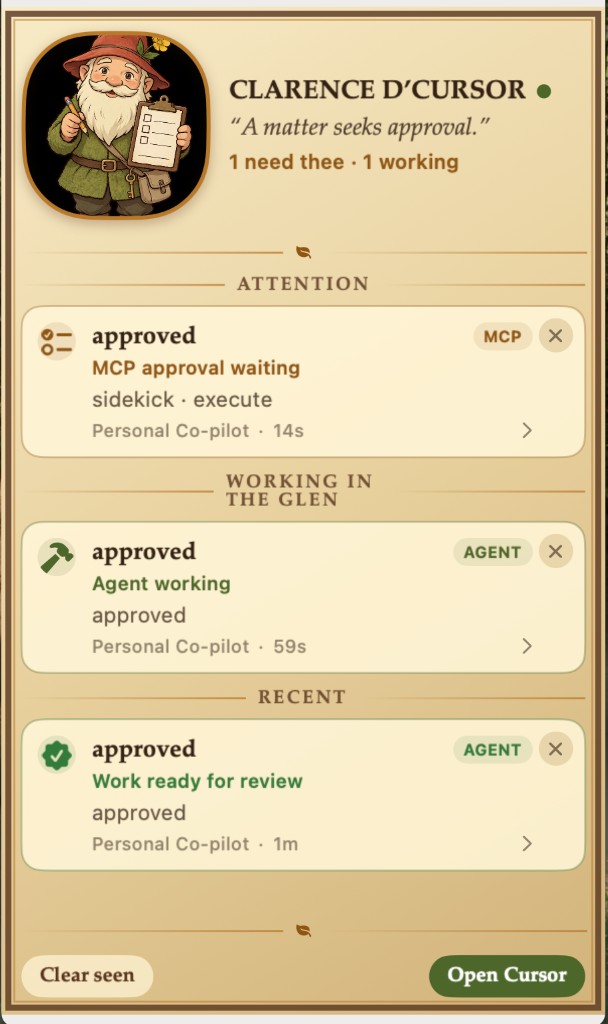
When several agents are working at once, Clarence turns their local events into one calm, persistent dashboard.
Questions and likely approvals rise to the top in a distinct attention state.
Parent agents and their subagents stay visible while they work, finish, or stop.
Open the relevant workspace, copy the conversation ID, or use the transcript fallback.
Agent activity stays in a compact local log with sensitive details left out.
Clarence changes his portrait and Dock icon to match the most urgent thing happening.







Clarence reads compact summaries from Cursor’s local hook events and stores them in a rotating local log.
Everything you need to install, use, and remove Clarence.
Clarence runs locally and works without Accessibility access. Event data and tool output stay off external services.
Install.command.Install.command, choose Open, and confirm.The installer copies the app to ~/Applications, safely merges Clarence into your existing Cursor hooks, preserves unrelated hooks, and adds launch-at-login.
An existing hooks file is backed up as ~/.cursor/hooks.json.before-clarence.
Cursor currently lacks a supported external deep link for local conversation IDs. Clarence opens the relevant workspace, copies the ID, and keeps the transcript available as a fallback.
Events stay on your Mac at:
~/Library/Application Support/Clarence D'Cursor/events.jsonl
The collector stores compact summaries, redacts common credential patterns, omits tool output and full MCP parameters, uses a file lock for concurrent agents, and rotates the log at 5 MB.
Elgato actions require a separate setup. Clarence works alongside an existing ~/.cursor/hooks/elgato-alert.sh configuration.
Double-click Uninstall.command. It removes the app, login item, collector, and only Clarence-owned hook entries. Local event history is retained unless you delete it manually.
The download includes the Swift package, checks, artwork, and build scripts used for this release.
Download the local macOS companion and keep every Cursor agent within sight.
Download Clarence v1.2.214 MB · macOS 14+ · Apple Silicon